Harvest vs Everhour vs Toggl Track for software teams: integrations, estimates and pricing
Harvest vs Everhour vs Toggl Track for dev teams: Linear, Jira and GitHub integrations, timers, estimates vs actuals, reports and November 2026 prices.
Short answer: Harvest vs Everhour comes down to money against estimates. Harvest is the better pick if you invoice clients from your time tracker; Everhour is better if you want estimates and budgets next to each issue in Linear, Jira or GitHub. Toggl Track is the most flexible timer of the three and the cheapest for very small teams, but its link to issues is looser.
All three are good time trackers. For a software team the question is narrower: how well does each one attach hours to the issue in your tracker, and what can you do with those hours afterwards? We checked each vendor's own pages and pricing as of November 2026.
Harvest vs Everhour vs Toggl Track at a glance
| Harvest | Everhour | Toggl Track | |
|---|---|---|---|
| Linear | Extension: Start timer in the issue sidebar | Extension: timer and estimate on each issue | Not confirmed on Toggl's pages |
| Jira | Marketplace app: timer on every issue | Marketplace add-on, writes Jira worklogs | Extension, plus one-way Jira Sync |
| GitHub | Extension on issues and pull requests | Extension: timer and estimate on issues | Extension timer in GitHub |
| Estimates | Project budgets | Task estimates, project budgets | Task estimates; project estimates from Starter |
| Invoicing | Yes, with online payments | Yes, on Team | Billable rates from Starter |
| Free plan | 1 seat, 2 projects | Up to 5 seats, no integrations | Up to 3 users |
| Paid, billed annually | $9/seat/mo | $8.50/seat/mo, 5-seat minimum | $9/user/mo |
Integrations with Linear, Jira and GitHub
Linear
Linear has no timer of its own, so this is where the two specialists earn their keep. Harvest's Linear integration adds a Start timer button to the issue properties sidebar through its Chrome, Firefox or Edge extension, and entries link back to the issue. Harvest's help notes that it works from the browser extension, not the desktop app, and that Harvest projects are not synced with Linear automatically.
Everhour connects to your Linear workspace and its extension shows a timer, the issue's estimate and its reported time on each issue, with the project's hours against its estimate in the header. Everyone who tracks time needs the extension installed and up to date.
We could not find Linear on Toggl Track's own integration pages, so we leave it out. Our Linear time tracking guide covers the Linear options in more detail.
Jira
Harvest's Jira app, installed from the Atlassian Marketplace, adds a Harvest timer to the right-hand column of every issue. Everhour's add-on does the same and goes further: per Everhour's Jira Cloud guide, time tracked through Everhour is stored in Jira's native worklog, and you can make Everhour Jira's time tracking provider. Time entered directly in Jira does not flow back into Everhour. Toggl Track offers its extension in Jira and a Jira Sync that copies Jira projects and tasks into Toggl, one way only.
GitHub
Harvest's GitHub integration puts a Track Time control on issues and pull requests, shows time already logged to that item, and remembers the project and task you used last. Everhour's extension adds a time badge with logged and estimated time to each issue. Toggl's extension adds its timer icon to GitHub's interface.
Timers and timesheets
- Harvest: live timers or entries typed into a day or week view, with Mac and iOS apps.
- Everhour: a timer inside your tracker or manual entries, a day and week timesheet, and managers can lock timesheets once they are submitted.
- Toggl Track: a timer, entries after the fact or a week at a time, plus idle detection and Pomodoro. Of the three, it is the best timer for people who also track time outside the issue tracker.
Estimates vs actuals
This is the biggest difference for software teams. Everhour puts an estimate on each task and shows it beside the tracked time, inside the tracker, and adds fixed-fee or recurring project budgets with alerts. Harvest updates project budgets as people track time, which is good for "are we inside the budget?" and weaker for "which issue ran over?". Toggl Track has task estimates on every plan, project estimates from Starter, and email alerts when a project hits a threshold you set.
If you estimate issues in hours and review them every cycle, Everhour is the closest fit of the three.
Reporting
- Harvest: visual reports on time by project and task and on team capacity, custom filters and scheduled reports. Profitability reporting and unlimited custom reports are on Enterprise.
- Everhour: customizable reports with filters; the free plan's reports are limited.
- Toggl Track: summary and detailed time logs by project, client, member and tag, exported as PDF, CSV or XLSX. Starter adds team and revenue reports; Premium adds labour cost and profitability.
Pricing as of November 2026
From each vendor's pricing page:
- Harvest (pricing): Free for 1 seat and 2 projects; Teams $9 per seat per month billed annually or $11 monthly; Enterprise $14 annually or $17.50 monthly.
- Everhour (pricing): Free for up to 5 seats without integrations; Team $8.50 per seat per month billed yearly, minimum 5 seats.
- Toggl Track (pricing): Free for up to 3 users; Starter $9 per user per month billed annually or $12 monthly; Premium $16 annually or $24 monthly.
For a team of five that tracks against Linear, Everhour and Harvest land close together. For a team of three, Everhour's minimum makes it the most expensive.
Who each one suits
- Harvest: agencies and freelancers who turn hours into invoices and expenses, and want the timer in Linear, Jira or GitHub. See also how agencies track billable hours.
- Everhour: product and agency teams who estimate in hours, watch budgets and want both visible inside their tracker.
- Toggl Track: teams who track time across many tools, or very small teams who want a capable free plan.
None of the three suits you? Our list of Everhour alternatives adds Clockify, Tempo and others.
The other route: time built into the tracker
All three tools are a second app beside your issue tracker, joined by an extension or a sync. The alternative is an issue tracker that records time itself. Notch, which we build, puts a timer, an hour estimate and an estimate bar on every issue, fills a weekly timesheet from the timers, and reports time by person, issue, team, label, project or cycle with CSV export.
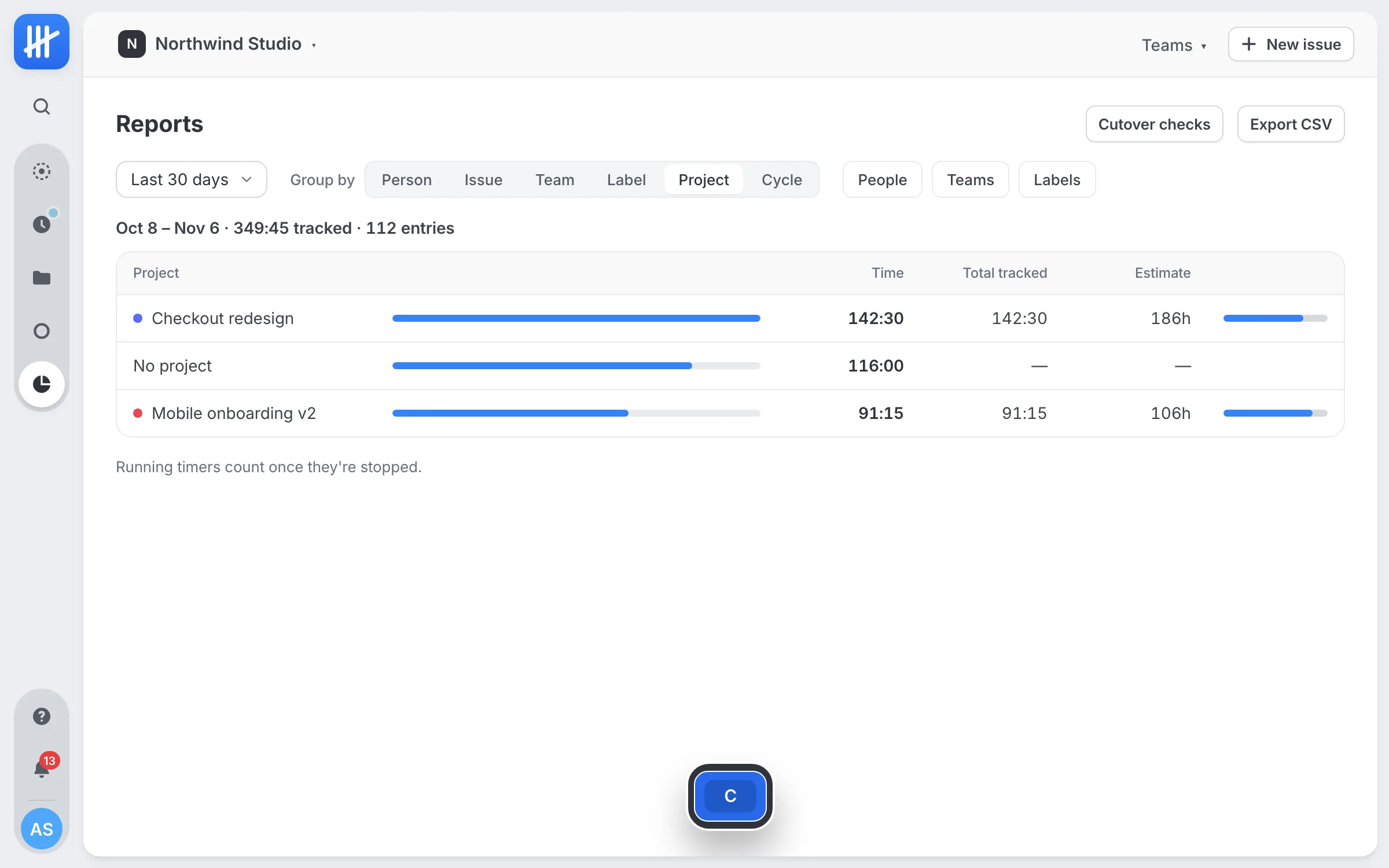
Notch has no invoicing or billable rates, so teams that bill export the report to their invoicing tool, and it has no Jira or GitHub integration. If you want to leave Linear rather than add to it, Linear alternatives with time tracking compares Notch with YouTrack, ClickUp, Redmine, Plane and Asana.
Questions people ask
Is Harvest or Everhour better for Linear?
Both add a timer inside Linear through a browser extension. Everhour also shows each issue's estimate and the project's hours against its estimate inside Linear, so it is the stronger fit if estimates matter; Harvest is stronger if you invoice from your time tracker.
Which is cheapest for a team of three?
As of November 2026, Toggl Track's free plan covers up to 3 users, and Harvest Teams is $9 per seat per month billed annually, so $27 for three. Everhour Team is $8.50 per seat but has a 5-seat minimum, so three people pay for five.
Does Toggl Track work with Jira?
Yes. Its browser extension adds a timer to Jira, and a native Jira Sync brings Jira projects and tasks into Toggl. The sync is one way, from Jira to Toggl.
Do any of them write time back to Jira worklogs?
Everhour does: time tracked through its Jira add-on is stored in Jira's native worklog. Time entered directly in Jira does not sync back into Everhour.